
Service explanation for JA-110M
BUS module for connecting magnetic detector (2 inputs)
This product is part of the JABLOTRON JA-100 alarm system. It makes it possible to connect two magnetic contacts via two independent inputs with the possibility to set the properties. The module occupies two positions in the system. The detector reacts to the condition (it reports activation and deactivation). The product is intended for installation by a trained technician with a valid Jablotron certificate
Installation
Choose a location for the module such that the cables to the detectors are a maximum of 3 m long.
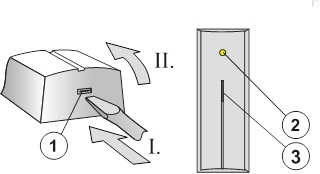
Image: 1 – click clamp of the hood; 2 – yellow signal light of the fault; 3 – red signal light of the activation inputs;
1. Open the hood and take out the plate with electronics (by pressing the click clamp)
2. Pull the cables through the plastic back wall and screw it into place at the chosen location.
Before connecting the BUS, the system must be disconnected from the power supply.
3. Replace the electronics and connect the cables to the terminals.
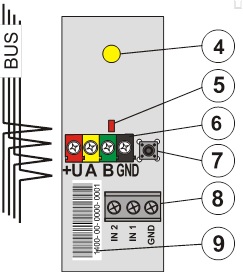
Image: 4 – yellow signal light of the fault; 5 – red signal light of the activation inputs; 6 – bus terminals; 7 - tamper switch; 8 – detector terminals; 9 – serial number;
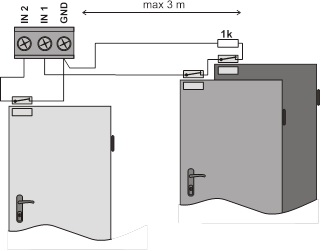
4. If you want to use a balanced loop for higher protection of the detector supply cables, connect a 1k resistor in series with the detector (see the following figure). The balancing function must be enabled when setting the properties.
5. Follow the installation manual of the control panel. Basic steps:
a. After switching on, the yellow signal light flashes because the detector is not included in the system.
b. In the F-Link program, select the desired position on the Peripherals card and start the learning mode with the Read button.
c. Press the tamper switch in the module (7) - this will teach the detector and the yellow signal light will go out. Please note – the module occupies 2 consecutive positions (one each input).
6. Close the module cover.
Set module properties
This is done by the F-Link program – card Peripherals. Select the Internal settings at the module position (first or second). A dialog will appear in which you can set:
Response from input 1(2): Off – does not respond (the input can be turned off completely), Unbalanced – responds to disconnecting the contact, Balanced – there is a 1k resistor in series with the contact. Activation occurs when the resistance drops below 700 Ohm or rises above 1300 Ohm.
Delay of response to run-in: time filter to improve immunity against false activation – setting of 0.1 sec ... 300 sec determines how long the INP1(2) input must be active before it is activated in the control panel.
Reverse reaction of running-in: The input is factory set to respond to circuit disconnection (NC). You can also set the response to making contact (NO).
LED indication is on: it allows switching off the red signal light of the activation of each input.
Technical parameters
Power supply from the central BUS 12 V (9…15 V)
Power consumption in standby (rest) 5 mA
Power consumption for choice of cable 5 mA
Max. length of interconnection cable from input to detector 3 m
Dimensions 100 x 40 x 24 mm
Classification grade 2
in accordance with CSN EN 50131-1, CSN EN 50131-3
Environment according to CSN EN 50131-1 II. inside, general
Working temperature range -10 to +40 °C
Furthermore complies with CSN EN 50130-4, CSN EN 55022
Installation
Choose a location for the module such that the cables to the detectors are a maximum of 3 m long.
Image: 1 – click clamp of the hood; 2 – yellow signal light of the fault; 3 – red signal light of the activation inputs;
1. Open the hood and take out the plate with electronics (by pressing the click clamp)
2. Pull the cables through the plastic back wall and screw it into place at the chosen location.
Before connecting the BUS, the system must be disconnected from the power supply.
3. Replace the electronics and connect the cables to the terminals.
Image: 4 – yellow signal light of the fault; 5 – red signal light of the activation inputs; 6 – bus terminals; 7 - tamper switch; 8 – detector terminals; 9 – serial number;
4. If you want to use a balanced loop for higher protection of the detector supply cables, connect a 1k resistor in series with the detector (see the following figure). The balancing function must be enabled when setting the properties.
5. Follow the installation manual of the control panel. Basic steps:
a. After switching on, the yellow signal light flashes because the detector is not included in the system.
b. In the F-Link program, select the desired position on the Peripherals card and start the learning mode with the Read button.
c. Press the tamper switch in the module (7) - this will teach the detector and the yellow signal light will go out. Please note – the module occupies 2 consecutive positions (one each input).
6. Close the module cover.
Set module properties
This is done by the F-Link program – card Peripherals. Select the Internal settings at the module position (first or second). A dialog will appear in which you can set:
Response from input 1(2): Off – does not respond (the input can be turned off completely), Unbalanced – responds to disconnecting the contact, Balanced – there is a 1k resistor in series with the contact. Activation occurs when the resistance drops below 700 Ohm or rises above 1300 Ohm.
Delay of response to run-in: time filter to improve immunity against false activation – setting of 0.1 sec ... 300 sec determines how long the INP1(2) input must be active before it is activated in the control panel.
Reverse reaction of running-in: The input is factory set to respond to circuit disconnection (NC). You can also set the response to making contact (NO).
LED indication is on: it allows switching off the red signal light of the activation of each input.
Technical parameters
Power supply from the central BUS 12 V (9…15 V)
Power consumption in standby (rest) 5 mA
Power consumption for choice of cable 5 mA
Max. length of interconnection cable from input to detector 3 m
Dimensions 100 x 40 x 24 mm
Classification grade 2
in accordance with CSN EN 50131-1, CSN EN 50131-3
Environment according to CSN EN 50131-1 II. inside, general
Working temperature range -10 to +40 °C
Furthermore complies with CSN EN 50130-4, CSN EN 55022