
Service explanation for JA-110P
Wired PIR motion detector
This product is part of the JABLOTRON JA-100 alarm system. It ensures detection of movement of people within buildings. Its detection characteristic can be changed by using an alternative lens. False alarm immunity is optional, in two levels. The detector has a pulse response (only reports its own activation). The product is intended for installation by a trained technician with a valid Jablotron certificate.
Installation
The detector can be installed on a wall or in a corner of the room. It is better if within its reach there are no objects that change temperature quickly (electric heaters, gas appliances and the like), no moving objects (e.g. billowing curtains above a radiator) or pets. It is not recommended to install the detector opposite windows or reflectors, not even where there is air flow (ventilation, air conditioning, draft holes, non-closing doors, etc.). There should be no objects in front of the detector that obstruct the view.
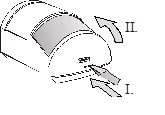
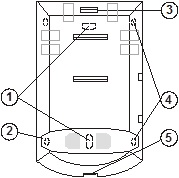
Image: 1 – holes for mounting on a flat wall; 2, 4 – holes for mounting in a corner; 3 – click clamp of the electronics plate; 5 – hood snap clamp;
1. Open the detector cover (by pressing the click clamp 5). Do not touch the PIR sensor (11) inside - so as not to damage it.
2. Remove the electronics - they are attached to the click clamp 3.
3. Make holes in the plastic back wall for screws and cable. The recommended height for installing the detector is 2.5 m above the floor.
4. Pull the bus cable through and screw the plastic back panel into place (vertically, with the click clamp for the hood downwards).
Before connecting the BUS, the system must be disconnected from the power supply.
5. Replace the electronics and connect the cable to the terminals (8).
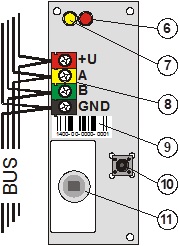
Image: 6 – red activation signal light; 7 – yellow signal light of the fault; 8 – bus terminals; 9 – serial number; 10 – tamper switch; 11 – PIR sensor;
6. Follow the installation manual of the control panel. Basic steps:
a. After switching on, the yellow signal light (7) flashes because the detector is not included in the system.
b. In the F-Link program, select the desired position on the Peripherals card and start the learning mode with the Read button.
c. Press the tamper switch in the detector (10) - this will teach the detector and the yellow signal light will go out. Please note – the module occupies 2 consecutive positions (one each input).
7. Close the detector cover.
Set detector properties
This is done by the F-Link program – card Peripherals. Select the Internal settings at the detector position (first or second). A dialog will appear in which you can set:
Immunity Level: Determines immunity against false alarms. By default (from the factory), basic immunity is combined with a rapid response. The Increased level provides better immunity, but the detector responds more slowly.
LED indication of movement: allows you to switch off the indication of movement by the red LED.
Detection characteristic
The detector is equipped with a 110°/12m lens from the factory. The space is covered by 3 fans (curtain fields) – see the following image.
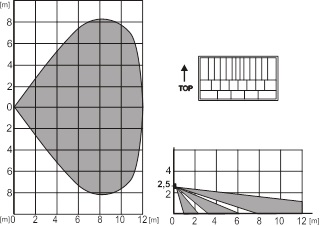
The characteristic can be changed by using an alternative lens:
JS-7904 is intended for long corridors, has a range of up to 20m
The increased immunity cannot be used with this lens!
JS-7906 only has the upper fan of 120°/12m and does not cover the floor (may eliminate movement of small animals across the floor)
JS-7901 vertical curtain field – does not cover the surface, but creates a detection wall (a barrier can be defined, any crossing is reported)
Note: After replacing the lens, check whether the detector covers the space properly (incorrectly installed lens can cause a detection error).
Technical parameters
Power supply from the central BUS 12 V (9 ... 15 V)
Power consumption in standby (rest) 5 mA
Power consumption for choice of cable 5 mA
Recommended installation height 2.5 m above the floor
Detection angle / detection coverage 110° / 12 m (with basic lens)
Dimensions 95 x 60 x 55 mm
Classification grade 2
in accordance with CSN EN 50131-1, CSN EN 50131-2-2
Environment according to CSN EN 50131-1 II. inside, general
Working temperature range -10 to +40 °C
Furthermore complies with CSN EN 50130-4, CSN EN 55022
Installation
The detector can be installed on a wall or in a corner of the room. It is better if within its reach there are no objects that change temperature quickly (electric heaters, gas appliances and the like), no moving objects (e.g. billowing curtains above a radiator) or pets. It is not recommended to install the detector opposite windows or reflectors, not even where there is air flow (ventilation, air conditioning, draft holes, non-closing doors, etc.). There should be no objects in front of the detector that obstruct the view.
Image: 1 – holes for mounting on a flat wall; 2, 4 – holes for mounting in a corner; 3 – click clamp of the electronics plate; 5 – hood snap clamp;
1. Open the detector cover (by pressing the click clamp 5). Do not touch the PIR sensor (11) inside - so as not to damage it.
2. Remove the electronics - they are attached to the click clamp 3.
3. Make holes in the plastic back wall for screws and cable. The recommended height for installing the detector is 2.5 m above the floor.
4. Pull the bus cable through and screw the plastic back panel into place (vertically, with the click clamp for the hood downwards).
Before connecting the BUS, the system must be disconnected from the power supply.
5. Replace the electronics and connect the cable to the terminals (8).
Image: 6 – red activation signal light; 7 – yellow signal light of the fault; 8 – bus terminals; 9 – serial number; 10 – tamper switch; 11 – PIR sensor;
6. Follow the installation manual of the control panel. Basic steps:
a. After switching on, the yellow signal light (7) flashes because the detector is not included in the system.
b. In the F-Link program, select the desired position on the Peripherals card and start the learning mode with the Read button.
c. Press the tamper switch in the detector (10) - this will teach the detector and the yellow signal light will go out. Please note – the module occupies 2 consecutive positions (one each input).
7. Close the detector cover.
Set detector properties
This is done by the F-Link program – card Peripherals. Select the Internal settings at the detector position (first or second). A dialog will appear in which you can set:
Immunity Level: Determines immunity against false alarms. By default (from the factory), basic immunity is combined with a rapid response. The Increased level provides better immunity, but the detector responds more slowly.
LED indication of movement: allows you to switch off the indication of movement by the red LED.
Detection characteristic
The detector is equipped with a 110°/12m lens from the factory. The space is covered by 3 fans (curtain fields) – see the following image.
The characteristic can be changed by using an alternative lens:
JS-7904 is intended for long corridors, has a range of up to 20m
The increased immunity cannot be used with this lens!
JS-7906 only has the upper fan of 120°/12m and does not cover the floor (may eliminate movement of small animals across the floor)
JS-7901 vertical curtain field – does not cover the surface, but creates a detection wall (a barrier can be defined, any crossing is reported)
Note: After replacing the lens, check whether the detector covers the space properly (incorrectly installed lens can cause a detection error).
Technical parameters
Power supply from the central BUS 12 V (9 ... 15 V)
Power consumption in standby (rest) 5 mA
Power consumption for choice of cable 5 mA
Recommended installation height 2.5 m above the floor
Detection angle / detection coverage 110° / 12 m (with basic lens)
Dimensions 95 x 60 x 55 mm
Classification grade 2
in accordance with CSN EN 50131-1, CSN EN 50131-2-2
Environment according to CSN EN 50131-1 II. inside, general
Working temperature range -10 to +40 °C
Furthermore complies with CSN EN 50130-4, CSN EN 55022