
Service explanation for JA-112E
Wired control panel with RFID
The access module is a component of the JABLOTRON JA-100 system. Thanks to the surface-mounted system, it is possible to put together a configuration that is tailored to the installation size and the wishes of the users. The product is intended for installation by a trained technician with a valid Jablotron certificate.
The wired access module (4) contains the first control segment (1). This configuration can be expanded with the desired number of JA-192E segments (up to a maximum of 20 per configuration).
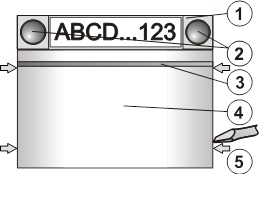
Image: 1 – operating segment; 2 – segment keys; 3 – illuminated activation key; 4 – RFID module; 5 – clamps for opening module;
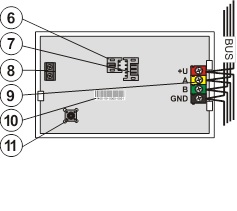
Image: 6 – audio module connection connector; 7 – connector operating segments; 8 – connection terminal for connecting the audio module to the central unit; 9 – bus connection terminal; 10 – serial number; 11 – tamper switch
Installation
1. Press the four clamps on the sides one after the other (see Fig. 1) and release the module from the plastic back wall.
2. When installing a next operating segment, first remove the closing cap at the top of the 1st segment.
3. Remove the transparent cover caps from segments (by pulling forcefully on both sides of the segment keys).
4. Always connect the guide wire of the segment to the connector of the previous segment and click them together (it is best to always rotate the guide wires by rotating the segment by 360° - this way the wires do not accidentally get wedged between the plastic parts). Install all desired operating segments in the same way. Finally, replace the closing cap (click it in).
5. Pull the cable through the plastic back wall and screw the back wall with segments at the selected location. When using multiple operating segments, also secure the segments to the wall (choose the number of screws as needed).
6. Connect the bus cable to the connection terminal (9).
Before connecting the BUS, the system must be disconnected from the power supply.
7. Connect the supply for segments to the internal connector of the module (7).
8. Click the RFID module into the configuration.
9. Follow the instructions for installing the central unit. Basic steps:
a. After switching on, the yellow signal light flashes because the module has not been read into the system.
b. In the F-Link program, select the required position on the Peripherals card and start the learning mode with the Read button.
c. Press the illuminated activation button (3), which causes the module to learn and the yellow light to go out.
10. After installation is complete, place the description labels in the cover caps of the segments and close the caps. Description labels are printed as part of the F-Link program (Peripherals card, at the position of the RFID module - Internal setting).
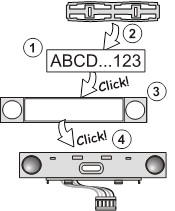
Image: Place description label in the operating segment.
Set properties
This is done by the F-Link program – card Peripherals. Use internal setting at the position of the RFID module. The current configuration appears, with the option to set its properties. Individual segments can be assigned the desired functions (operating sections, signaling the status of sections, raising the alarm, operating the PG output, signaling the status of the PG output, etc.). Details can be found in the F-Link program.
Change configuration
If the configuration of segments needs to be changed, pull them apart at the point of connection, on the sides (on the side of the keys).
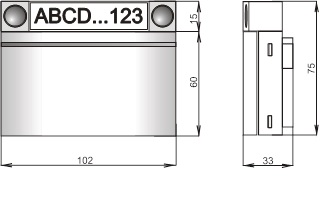
Technical parameters
Power supply from the control panel bus (9…15 V)
Power consumption in standby (rest) 10 mA
Power consumption for choice of cable 15 mA
Each added control segment 0.5mA
Operating frequency RFID 125 kHz
Working temperature range -10 to +40 °C
Environment according to CSN EN 50131-1 II. inside, general
Classification grade 2
in accordance with CSN EN 50131-1, CSN EN 50131-3,
Furthermore complies with CSN ETSI EN 300330, CSN EN 50130-4
CSN EN 55022, CSN EN 60950-1
Conditions for operation CTÚ No. VO-R/10/09.2010-11
Product JA-112E is designed and manufactured in accordance with the provisions applicable to it: Government Decree No. 426/2000 Coll. in the text of later promulgated regulations, provided that they are used according to their intended purpose.
Note: Although this product does not contain harmful materials, do not dispose of it in the household waste, but hand it in at the collection point intended for electronic waste.
The wired access module (4) contains the first control segment (1). This configuration can be expanded with the desired number of JA-192E segments (up to a maximum of 20 per configuration).
Image: 1 – operating segment; 2 – segment keys; 3 – illuminated activation key; 4 – RFID module; 5 – clamps for opening module;
Image: 6 – audio module connection connector; 7 – connector operating segments; 8 – connection terminal for connecting the audio module to the central unit; 9 – bus connection terminal; 10 – serial number; 11 – tamper switch
Installation
1. Press the four clamps on the sides one after the other (see Fig. 1) and release the module from the plastic back wall.
2. When installing a next operating segment, first remove the closing cap at the top of the 1st segment.
3. Remove the transparent cover caps from segments (by pulling forcefully on both sides of the segment keys).
4. Always connect the guide wire of the segment to the connector of the previous segment and click them together (it is best to always rotate the guide wires by rotating the segment by 360° - this way the wires do not accidentally get wedged between the plastic parts). Install all desired operating segments in the same way. Finally, replace the closing cap (click it in).
5. Pull the cable through the plastic back wall and screw the back wall with segments at the selected location. When using multiple operating segments, also secure the segments to the wall (choose the number of screws as needed).
6. Connect the bus cable to the connection terminal (9).
Before connecting the BUS, the system must be disconnected from the power supply.
7. Connect the supply for segments to the internal connector of the module (7).
8. Click the RFID module into the configuration.
9. Follow the instructions for installing the central unit. Basic steps:
a. After switching on, the yellow signal light flashes because the module has not been read into the system.
b. In the F-Link program, select the required position on the Peripherals card and start the learning mode with the Read button.
c. Press the illuminated activation button (3), which causes the module to learn and the yellow light to go out.
10. After installation is complete, place the description labels in the cover caps of the segments and close the caps. Description labels are printed as part of the F-Link program (Peripherals card, at the position of the RFID module - Internal setting).
Image: Place description label in the operating segment.
Set properties
This is done by the F-Link program – card Peripherals. Use internal setting at the position of the RFID module. The current configuration appears, with the option to set its properties. Individual segments can be assigned the desired functions (operating sections, signaling the status of sections, raising the alarm, operating the PG output, signaling the status of the PG output, etc.). Details can be found in the F-Link program.
Change configuration
If the configuration of segments needs to be changed, pull them apart at the point of connection, on the sides (on the side of the keys).
Technical parameters
Power supply from the control panel bus (9…15 V)
Power consumption in standby (rest) 10 mA
Power consumption for choice of cable 15 mA
Each added control segment 0.5mA
Operating frequency RFID 125 kHz
Working temperature range -10 to +40 °C
Environment according to CSN EN 50131-1 II. inside, general
Classification grade 2
in accordance with CSN EN 50131-1, CSN EN 50131-3,
Furthermore complies with CSN ETSI EN 300330, CSN EN 50130-4
CSN EN 55022, CSN EN 60950-1
Conditions for operation CTÚ No. VO-R/10/09.2010-11
Product JA-112E is designed and manufactured in accordance with the provisions applicable to it: Government Decree No. 426/2000 Coll. in the text of later promulgated regulations, provided that they are used according to their intended purpose.
Note: Although this product does not contain harmful materials, do not dispose of it in the household waste, but hand it in at the collection point intended for electronic waste.